How to Register on NAVTTC Website
Follow these steps to create your account on the official NAVTTC skill development portal:
- Visit the official NAVTTC website: https://nsis.navttc.gov.pk
- Click on the **"Sign Up"** or **"Register"** button.
- Carefully fill in your personal details, ensuring accuracy:
- Full Name (as per **CNIC**)
- **CNIC** Number (crucial for verification)
- Active Email Address
- Mobile Number
- Create a strong, secure password
- Verify your email address via the confirmation link.
- Complete your profile by adding educational qualifications and current address.
Important: All information provided *must* perfectly match your **CNIC** details. Discrepancies will lead to application rejection.
How to Login to Your NAVTTC Account
Once registered and verified, use the following steps to access your applicant dashboard:
- Navigate to the NAVTTC login page: https://nsis.navttc.gov.pk/sign-in
- Enter your **CNIC number** (without dashes) in the username field.
- Input your registered password.
- Click the **"Sign In"** button.
- For a lost password, use the **"Forgot Password"** option for an email reset.
Pro-Tip: Always ensure your mobile browser is updated for a seamless application process.
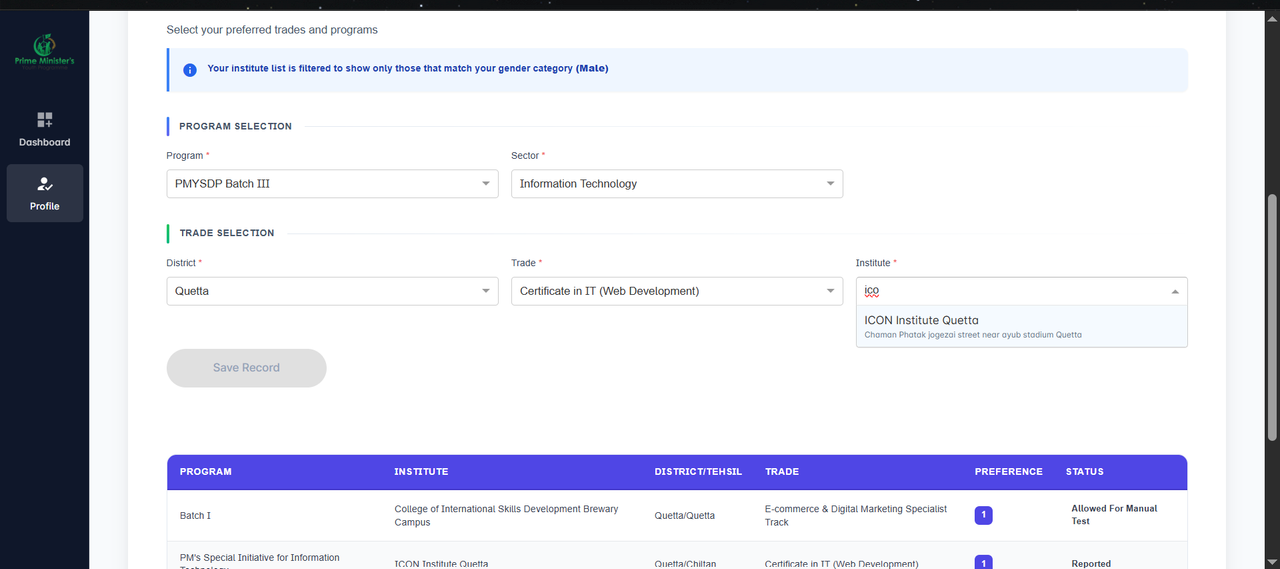
How to Select ICON Institute
This is the most critical step. Ensure you select the correct institute to enroll in our free courses:
- After logging in, click the **"Apply for Admission"** link.
- Fill in the necessary background and educational data.
- In the **"Institute Selection"** section:
- Select Province: **Balochistan**
- Select District: **Quetta**
- Select Institute: **"ICON Institute"**
- Choose your **desired course** from the programs available at ICON Institute.
- Review your form before proceeding to the final submission.
Why ICON Institute: We offer certified faculty, modern labs, and career support in Quetta.
Final Admission & Documentation
Once selected on the merit list, the final steps for enrollment are:
- Submit your online application through the NAVTTC portal.
- Regularly check the portal/SMS for the **Merit List** announcement.
- If selected, you will be notified to visit the institute for documentation.
- Bring the following **original documents** and photocopies to ICON Institute:
- Printed Application Form
- Original **CNIC** / B-Form
- Educational Certificates (Metric onward)
- Passport-Size Photographs (2x)
- Domicile Certificate
- Complete the in-person document verification.
Action Required: Document submission is time-bound. Do not delay your visit after the merit list is published.